
All apps · 0 apps

actual-ical
Docker app from DevlinDelFuego's Repository
Overview
Readme
View on GitHubactual-ical
A simple application to expose Actual Scheduled Transactions in iCal format.
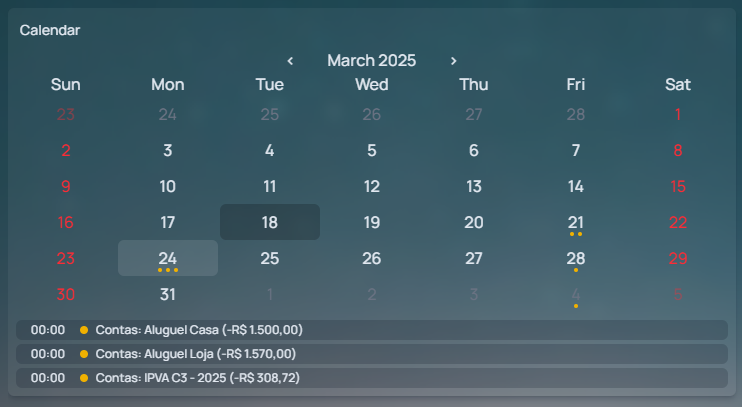
Features
- Currency display
- Respect schedule weekend configuration
- Realtime updates
- Random URL to make it harder to guess (using the Sync ID)
Usage
Just run the docker image
docker volume create actual-ical

docker run -d -p 3000:3000 \
  -v actual-ical:/app/.actual-cache \
  -e ACTUAL_SERVER=http://actual.example.com \
  -e ACTUAL_MAIN_PASSWORD=mainpassword \
  -e ACTUAL_SYNC_ID=syncid \
  ghcr.io/matheusvellone/actual-ical
Or with docker-compose
services:
  actual-ical:
    image: ghcr.io/matheusvellone/actual-ical
    ports:
      - 3000:3000
    environment:
      ACTUAL_SERVER: http://actual.example.com
      ACTUAL_MAIN_PASSWORD: mainpassword
      ACTUAL_SYNC_ID: syncid
    volumes:
      - actual-ical:/app/.actual-cache

volumes:
  actual-ical:
Then you can access the iCal feed at http://localhost:3000/actual.ics
If
SYNC_ID_AS_URLis set totrue, the URL will behttp://localhost:3000/{ACTUAL_SYNC_ID}.ics
Configuration
All configuration is done through environment variables.
| Name | Description | Required | Default |
|---|---|---|---|
| ACTUAL_SERVER | The server to use when connecting to the Actual API | true | |
| ACTUAL_MAIN_PASSWORD | The password to use when connecting to the Actual API | true | |
| ACTUAL_SYNC_ID | The sync ID to use when connecting to the Actual API. Find this ID in Settings > Advanced Settings > Sync ID | true | |
| SYNC_ID_AS_URL | Set to true to use the sync ID as part of the URL to make it safer to expose publicly, just like Google Calendar does |
false | |
| ACTUAL_SYNC_PASSWORD | The sync password | false | |
| ACTUAL_PATH | The path to store Actual cache data. The container must have write access to this path. | false | .actual-cache |
| EVENT_NAME_TEMPLATE | Template for the calendar event name. See Event template variables for available variables | false | {{scheduleName}} ({{amount}}) |
| EVENT_DESCRIPTION_TEMPLATE | Template for the calendar event description. See Event template variables for available variables | false | |
| TZ | The timezone to use on ical data | false | UTC |
| PORT | The port to listen on | false | 3000 |
| LOCALE | The locale to use when formatting amounts | false | en-US |
| CURRENCY | The currency to use when formatting amounts. Values must be one of these | false | USD |
| LOG_LEVEL | The log level to use. trace, debug, info, warn, error or fatal |
false | info |
Event template variables
The EVENT_NAME_TEMPLATE and EVENT_DESCRIPTION_TEMPLATE variables control the event title and description respectively. Variables are written as {{variableName}} and will be replaced at render time.
| Variable | Description |
|---|---|
scheduleName |
The name of the scheduled transaction in Actual |
amount |
The transaction amount, formatted according to LOCALE and CURRENCY |
accountName |
⚠️ The name of the Actual account the schedule belongs to |
Note: Some variables might not be defined for all events (marked with ⚠️). For example,
accountNamewill only be defined for schedules that belong to an account. If a variable is not defined, it will be replaced with an empty string.
Note 2: Template values are always trimmed, so any leading or trailing whitespace will be removed.
Hosting it publicly
If you want to host this application publicly, you should use SYNC_ID_AS_URL to make the URL random and harder to guess.
Categories
Related apps
Explore more like this
Explore allDetails
ghcr.io/matheusvellone/actual-icalRuntime arguments
- Web UI
http://[IP]:[PORT:3000]/- Network
bridge- Shell
sh- Privileged
- false
Template configuration
- Target
- /app/.actual-cache
- Value
- /mnt/user/appdata/actual-ical
- Target
- 3000
- Default
- 3000
- Value
- 3000
- Default
- http://actual.example.com
- Value
- http://ActualServer:5006
- Default
- en-US
- Value
- en-US
- Default
- USD
- Value
- USD
http://localhost:3000/{ACTUAL_SYNC_ID}.ics
- Default
- false
- Value
- false
- Default
- 99
- Value
- 99
- Default
- 100
- Value
- 100
- Default
- 022
- Value
- 022
- Default
- info
- Value
- info