

accounts-balance-tracker
Docker app from dodert's Repository
Overview
Readme
View on GitHubAccounts Balance Tracker
Self-hosted app to keep track of the balance of your accounts over time: current accounts, savings, investments, pension plans, crypto, cash and loans. Record each account's balance whenever you want (for example once a month) and see the total and how it evolves. Your data stays on your server.
Note: this project has been almost entirely vibe-coded with an AI coding assistant (Claude Code).
Contents
- Screenshots
- Install on Unraid
- Install with Docker on your computer
- First steps
- Settings
- Several users
- Backups and updates
- Features
- Development
- API
- License
Screenshots
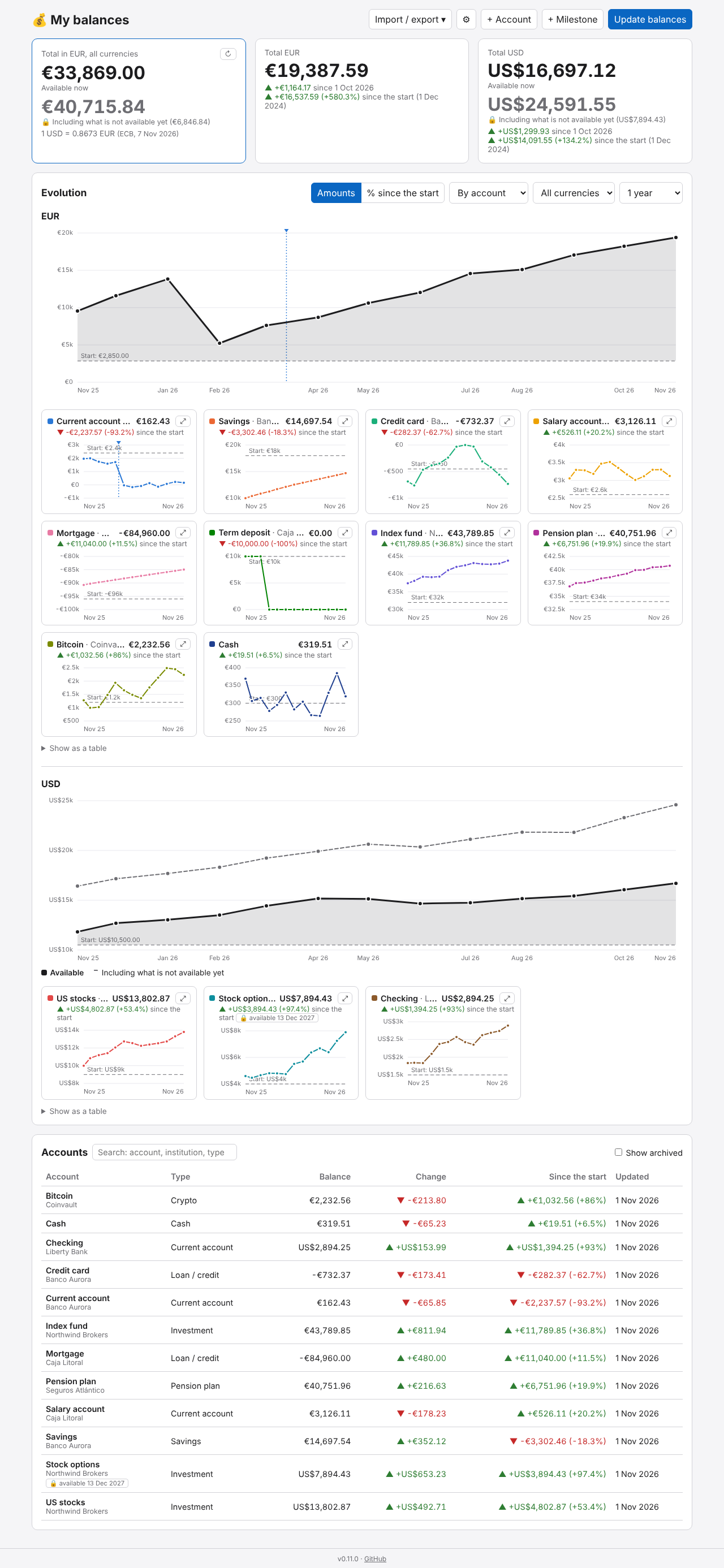
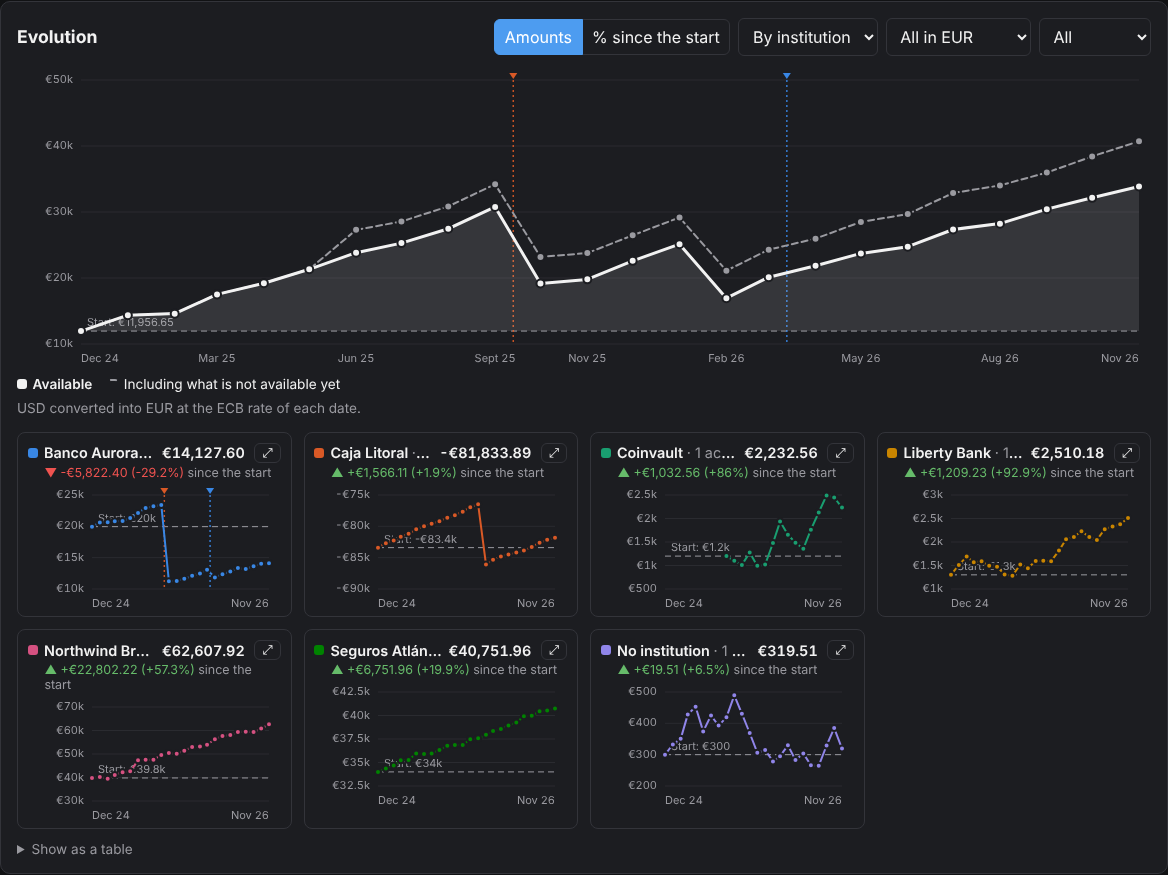
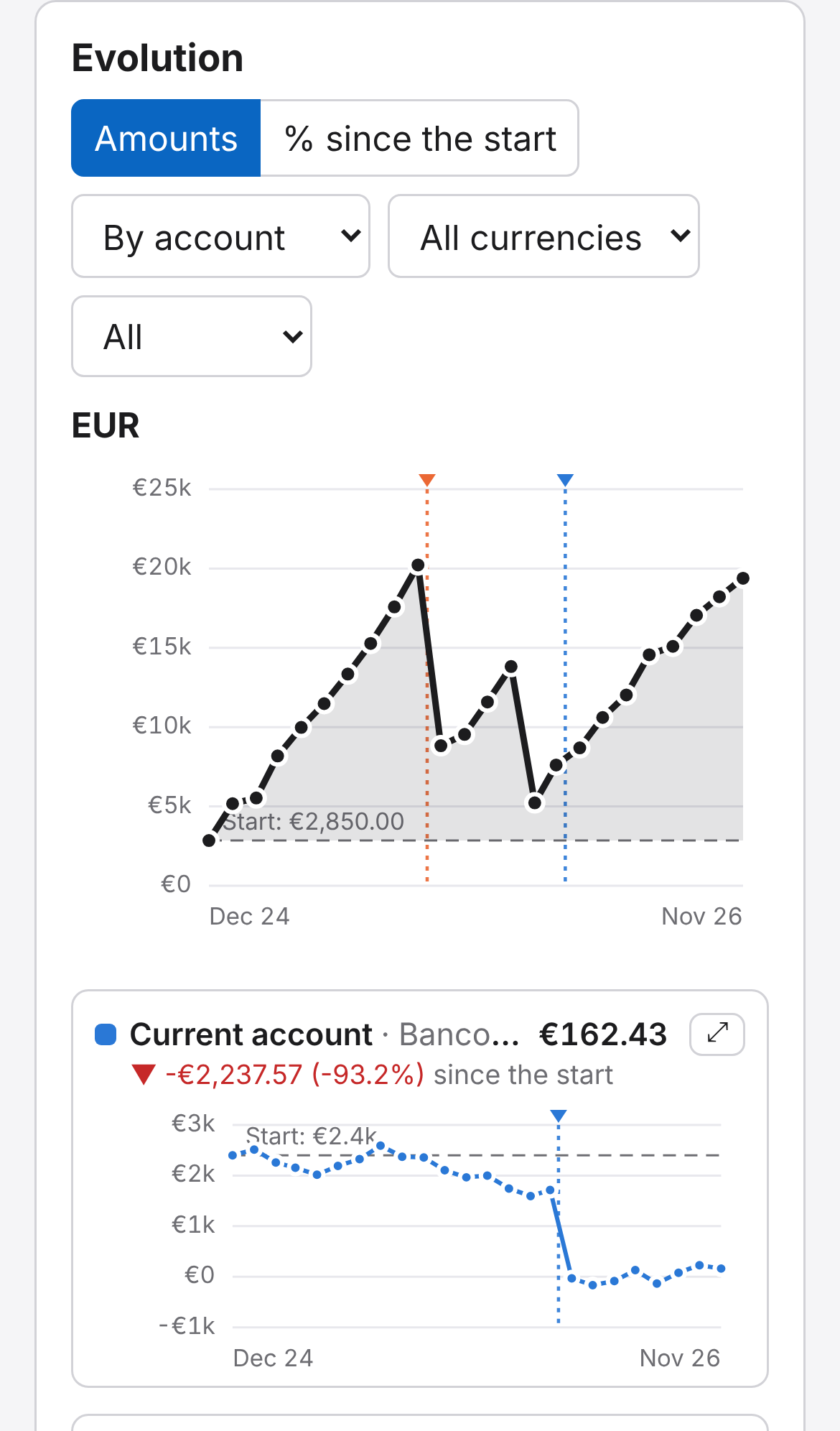
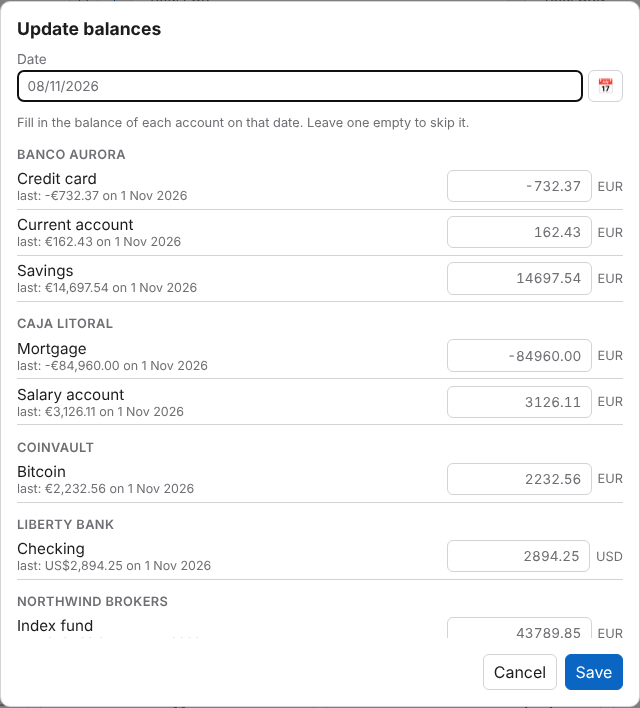
Screenshots from the demo mode: made-up sample data.
Install on Unraid
From Apps (Community Applications)
- Go to the Apps tab and search for Accounts Balance Tracker.
- Click it and then Install.
- Fill in Login user and Login password (recommended: the app holds financial data) and click Apply.
- Open
http://<your-unraid-ip>:8000, or click the app's icon in the Docker tab → WebUI.
Your data is kept in /mnt/user/appdata/accounts-balance-tracker. To update, use Check for updates in the Docker tab.
By hand, with the template
If it does not show up in Apps (Community Applications refreshes its list every few hours, so a new version or app can take a while):
- Open the Unraid Terminal (the
>_icon at the top right) and paste this line. It downloads the template:mkdir -p /boot/config/plugins/dockerMan/templates-user && curl -fsSL https://raw.githubusercontent.com/dodert/unraid-templates/main/accounts-balance-tracker.xml -o /boot/config/plugins/dockerMan/templates-user/my-accounts-balance-tracker.xml - Go to Docker → Add Container and pick accounts-balance-tracker in the Template list.
- Continue from step 3 above. To get a newer version of the template itself, run the line of step 1 again.
Prefer to see it under Apps → Private?
Run this in the terminal instead of step 1, then install it from Apps → Private:
mkdir -p /boot/config/plugins/community.applications/private/dodert && curl -fsSL https://raw.githubusercontent.com/dodert/unraid-templates/main/accounts-balance-tracker.xml -o /boot/config/plugins/community.applications/private/dodert/accounts-balance-tracker.xml
Install with Docker on your computer
You only need Docker. The steps are the same on every system: make a folder, download docker-compose.yml into it, and start it. Your data is saved in a data folder next to that file.
Windows
- Install Docker Desktop for Windows and open it (it may ask to install or update WSL; accept and restart if it asks). Wait until it says Engine running.
- Open PowerShell (Start menu → type PowerShell) and run, one line at a time:
mkdir $HOME\accounts-balance-tracker cd $HOME\accounts-balance-tracker curl.exe -fsSL -o docker-compose.yml https://raw.githubusercontent.com/dodert/accounts-balance-tracker/main/docker-compose.yml notepad docker-compose.yml - In Notepad, write a user and a password after
AUTH_USERNAME=andAUTH_PASSWORD=, changeTZto your time zone if you want, save and close. - Back in PowerShell:
docker compose up -d - Open http://localhost:8000 in your browser.
The data is in C:\Users\<you>\accounts-balance-tracker\data.
macOS
- Install Docker Desktop for Mac (pick Apple silicon or Intel: you can see which one in the Apple menu → About This Mac) and open it. Wait until it says Engine running.
- Open Terminal (Spotlight → type Terminal) and run:
mkdir -p ~/accounts-balance-tracker && cd ~/accounts-balance-tracker curl -fsSL -o docker-compose.yml https://raw.githubusercontent.com/dodert/accounts-balance-tracker/main/docker-compose.yml open -e docker-compose.yml - In TextEdit, write a user and a password after
AUTH_USERNAME=andAUTH_PASSWORD=, changeTZif you want, save and close. - Back in Terminal:
docker compose up -d - Open http://localhost:8000 in your browser.
The data is in ~/accounts-balance-tracker/data.
Linux
- Install Docker Engine with the Compose plugin: follow the guide for your distribution (Ubuntu, Debian, Fedora…). Check it with
docker compose version. - In a terminal:
Themkdir -p ~/accounts-balance-tracker && cd ~/accounts-balance-tracker curl -fsSL -o docker-compose.yml https://raw.githubusercontent.com/dodert/accounts-balance-tracker/main/docker-compose.yml sed -i "s/PUID=1000/PUID=$(id -u)/; s/PGID=1000/PGID=$(id -g)/" docker-compose.yml nano docker-compose.ymlsedline makes the data folder belong to your user. In the editor, setAUTH_USERNAMEandAUTH_PASSWORD(andTZif you want), then save withCtrl+O,Enter, and leave withCtrl+X. - Start it:
If you get permission denied, putdocker compose up -dsudoin front, or add yourself to thedockergroup (post-installation steps). - Open http://localhost:8000, or
http://<that-machine's-ip>:8000from another device.
The data is in ~/accounts-balance-tracker/data.
Without Compose: a single docker run
docker run -d --name accounts-balance-tracker --restart unless-stopped -p 8000:8000 \
  -v "$PWD/data:/data" -e PUID=$(id -u) -e PGID=$(id -g) \
  -e AUTH_USERNAME=me -e AUTH_PASSWORD=change-me \
  ghcr.io/dodert/accounts-balance-tracker:latest
Update, stop and uninstall
Run these in the folder with docker-compose.yml (PowerShell on Windows, Terminal on macOS and Linux):
| Update to the latest version | docker compose pull and then docker compose up -d |
| Stop it | docker compose down |
| Start it again | docker compose up -d |
| See its logs | docker compose logs -f (Ctrl+C to leave) |
| Uninstall | docker compose down, then delete the folder (this deletes your data: export a CSV first) |
To use another port, change the left number in "8000:8000" (e.g. "8080:8000") and open that port instead.
First steps
- Click Try it with sample data to look around with made-up data, or + Account to create your first account (name, institution, type and currency).
- Click Update balances whenever you want (e.g. once a month) and write the balance of each account on that date.
- The totals and charts fill in as you add balances. Already have them in a spreadsheet? Use Import / export → Import CSV (see Features).
Settings
Set them in docker-compose.yml (environment:) or in the Unraid template.
| Variable | Default | |
|---|---|---|
DEFAULT_CURRENCY |
EUR |
Currency for new accounts and CSV rows without one; totals in several currencies are added up in it |
FX_URL |
https://api.frankfurter.app |
Exchange-rate service (Frankfurter API or a self-hosted copy of it) |
DATABASE_URL |
empty | Empty = SQLite in /data. PostgreSQL: postgresql+psycopg://user:pass@host:5432/balances |
AUTH_USERNAME, AUTH_PASSWORD |
empty | Set both to ask for a login; changing the password logs everyone out |
AUTH_TOTP |
false |
true also asks for a one-time code; the first login shows the QR code. Delete .totp_secret in /data to show a new one |
FORWARDED_ALLOW_IPS |
127.0.0.1,::1,10.0.0.0/8,172.16.0.0/12,192.168.0.0/16,fc00::/7 |
Addresses (or CIDR ranges) of the reverse proxies whose X-Forwarded-For / X-Forwarded-Proto headers are trusted. The default trusts the local network and Docker networks, so a proxy or cloudflared there works as is, and a client coming straight from the internet can't fake its IP. To be stricter, set only your proxy's IP |
MULTI_USER |
false |
true = several users, each with their own encrypted database, registered by invitation. AUTH_USERNAME / AUTH_PASSWORD are then the admin's login (the one-time code is always asked). See Several users |
COUNTRY_DB |
true |
Multi-user only: download DB-IP's free country database once a month, to show the country of each user's last login |
ACCOUNT_DAYS |
30 |
Multi-user only: days a new account lasts. When it expires, its data is deleted and the user is blocked; the admin can extend it or remove the expiry. 0 = no expiry |
MAX_USERS |
100 |
Multi-user only: most users that can sign up (the admin is not counted) |
MAX_DB_MB |
10 |
Multi-user only: most size of each user's database, in MB; a change that would go over it is refused (413) |
FX_DAILY_LIMIT |
90 |
Multi-user only: most requests a day to the exchange-rate service, for all users together (then the stored rates are used) |
PUID, PGID, TZ, PORT |
99, 100, Etc/UTC, 8000 |
The app holds financial data: turn the login on, and expose it only on your LAN or behind a reverse proxy with HTTPS.
Wrong logins: after 10 wrong passwords, or 10 wrong one-time codes, from one IP in 15 minutes, that IP has to wait (429) until the oldest one is 15 minutes old; other IPs can still log in. A right password clears the count of its IP. IPv6 addresses count per /64 (one connection usually has the whole /64). Each user name also allows at most 30 wrong passwords in 15 minutes from all IPs together, so guessing from many addresses doesn't help either. Behind a reverse proxy the limit uses the real client IP only if the proxy's X-Forwarded-For is trusted; otherwise every visitor shares the proxy's IP and its limit. See also SECURITY.md.
Several users
With MULTI_USER=true, one instance serves several people, each with their own data. It is meant for sharing the app with friends or family, e.g. through a Cloudflare Tunnel.
- The admin logs in with
AUTH_USERNAME/AUTH_PASSWORDand the one-time code (always asked, set up on the first login). It goes to/admin, has no data of its own and can't read anyone's. - Invitations: the admin creates a link there (single use, valid for 7 days, optionally only for one email; a new one for the same email replaces the open one) and sends it. Opening a link in a browser where someone is already logged in says so, and signing up logs them out there. The person chooses a user name, email and password (at least 10 characters).
- Encrypted data: each user has their own SQLite database in
/data/users/<id>.db.enc, encrypted (AES-256-GCM) with a random key. That key is stored only encrypted with the user's password (Argon2id) and with a recovery key shown once at sign-up. Nobody without one of the two can read the data, the admin included. While the user is logged in the key travels in their session cookie, encrypted with the server's secret, and the database is decrypted in memory for each request. - Passwords: users change theirs in 👤 Account (their other devices are logged out, and the database is encrypted again with a new random key, so a key that got out, e.g. in a stolen cookie, stops working; the recovery key keeps working), and reset a forgotten one with the recovery key at Forgot your password? on the login page. Without the password and the recovery key the data is lost: there is no other way to open it.
/data/users.dbholds the users, invitations and logged-out sessions (no balances, no account names).- Admin panel (
/admin): the users with their email, sign-up date, last login (IP and country), size of their encrypted database and status; block / unblock (a blocked user is logged out at once and keeps their data), delete (the user and their data, for good) or delete and block the email; the open invitations; and the blocked emails, which can't sign up even with an invitation. - Country of the last login: behind Cloudflare, from its
CF-IPCountryheader (turn on Add visitor location headers in Cloudflare's Managed Transforms); otherwise from the free DB-IP IP to Country Lite database (CC BY 4.0), downloaded once a month to/data(COUNTRY_DB=falseturns the download off). The IP is never sent to another service. - Expiry: a new account lasts
ACCOUNT_DAYSdays (30 by default); the app warns the user in the last 3 days. Once expired, the user is blocked and their data deleted (checked every hour). In/adminthe admin can extend an account by some days (an expired one is unblocked and starts again empty) or set it to no expiry. - Limits: at most
MAX_USERSusers (100) andMAX_DB_MBMB (10) per user's database. - Exchange rates: a rate for a pair of currencies on a day is the same for everyone, so it is asked once for all users and kept in
/data/rates.db(only currencies, dates and rates). At mostFX_DAILY_LIMITrequests a day (90) go to the service; today's rate is asked again at most once an hour until the day's own rate is published. - Demo: anyone can try the demo from the login page (Try the demo) or
/demo, without an account. Each visitor gets their own copy of the sample data, kept in memory and dropped after an hour without use (at most 200 at once). - What it does not protect: while a user is logged in, the server has their data in memory to calculate totals and charts, so whoever runs the server could change it to read it. It protects the files on disk and their backups.
- Backups: copy the whole
/datafolder; the users' files stay encrypted in it. Before a schema change, each user's file is copied next to it (<id>.db.enc.backup-<from>-to-<to>-<date>) the first time they use the new version.
Backups and updates
The database schema is migrated automatically on start, keeping all the data.
Backups before updates: when an update changes the database schema, the SQLite database is first copied to /data/balances.db.backup-<from>-to-<to>-<date> (if the copy fails, the app does not start and nothing is changed). To go back: stop the container, run the previous image version, and replace balances.db with the backup (delete balances.db-wal and balances.db-shm if there are any). Delete old backups yourself when you no longer need them. With PostgreSQL the app cannot copy the database: run pg_dump before updating. Exporting a CSV now and then (Import / export → Export CSV) is also a good copy of everything.
File permissions: the SQLite database and its backups are only readable by the container's user (0600, PUID), whatever UMASK is; databases created by older versions are fixed on start.
Features
Accounts with a type, institution, currency and notes, and optionally the date their balance becomes available (e.g. unvested stock options: one account per vesting tranche). Until then they are flagged; the totals show two figures, the amount available now (main colour) and the total including what is not available yet (secondary colour), and the total chart also draws the available part. An institution can have several accounts, and the same name can be used in different institutions (e.g. "Payroll" at two banks). Archive the ones you close (record a 0 balance first so the history stays right).
Search in the accounts list (account, institution or type, ignoring case and accents): the accounts that do not match are dimmed, not hidden, and the charts do not change.
Balances: one per account and day; recording another on the same day replaces it. Update balances asks for every active account on one date at once, prefilled with the last balance. Loans and credit cards are recorded as negative balances.
Milestones: notable expenses of an account (a car, a trip…) with a date, an amount and a description, added with the + Milestone button at the top or from the account's window. They show on the charts as a dotted vertical line on their date, in the account's colour; hovering the line shows its description, amount, account and institution.
Totals per currency, with the change since the previous recorded date and since the first one (amount and %). Accounts and each account's balance history show the same two changes.
Several currencies added up: with accounts in more than one currency, a first box shows everything in
DEFAULT_CURRENCYat today's exchange rates, with the rate used and a button to refresh it. Rates are the European Central Bank's, from the free Frankfurter API (published once per working day, around 16:00 CET). Today's rate is fetched the first time it is needed each day and stored, so later visits do not call the service; past days are stored for good. Only the two currencies and the date are sent; amounts never leave the app: the conversion is done locally. If the service cannot be reached, the last stored rate is used and the box says so.Charts, for all time, 5 years, 1 year, 6 or 3 months, with a hover tooltip and a table view:
- Amounts: the total, then one small chart per account with its own scale. Each one has a dashed line at its first recorded balance (its start) and shows the change since then. The ⤢ button on an account opens its chart maximized (close it with Close, Esc or a click outside).
- % since the start: every account and the total on one chart, as the % change since each one's own start, so they can be compared.
Group by: by account (each one shown with its institution) or by institution (one series per institution, the sum of its accounts; its start is its total on the first date any of them had a balance). The choice is saved in the browser.
Currency: with accounts in more than one currency, All currencies (the default) shows the charts of each currency one after the other, each in its own currency (no conversion); or pick one currency. All in EUR (the default currency) converts every account into it, each date at that date's ECB rate, and draws them on one chart; the rates are stored, so each date is asked for once, and only currencies and dates are sent, never amounts.
Each account keeps its colour in every chart (16 colours; past 16 they repeat) and the total is drawn in black (white in dark mode). An account keeps its last recorded balance until a new one is recorded.
CSV import / export: one row per account and date. Columns
account,date,amount(required) andtype,currency,institution,note,available_from(optional;available_fromandtypeare only used when an account is created); Spanish names also work (cuenta,fecha,saldo,tipo,moneda,entidad,nota,disponible_desde). Comma, semicolon or tab separated; UTF-8 or Windows-1252; amounts as1234.56,1.234,56or1,234.56; datesYYYY-MM-DDorDD/MM/YYYY. An account is found by its name and institution (without an institution in the row, by its name when only one account has it). Missing accounts are created, and a balance already recorded on that date is replaced.Demo mode (⚙ → Demo mode, the Try it with sample data button when there are no accounts yet, or the link
/demo): the app with made-up sample data (several institutions and accounts, EUR and USD, stock options not available yet, a mortgage, a closed account, two years of history), to show it to other people or to see how it works. The sample data lives in its own temporary database, apart from the real one, which is not read or changed while a browser is in demo mode; a banner shows it, with buttons to reset the sample data and to leave the demo. It is per browser (a cookie) and needs the login like the rest of the app. A demo's data is limited to 5 MB, and CSV files imported into it to 1 MB. In multi-user mode, one address (IPv6: one /64) can start 10 demos an hour; demos never ask the exchange-rate service: they use the rates already stored.Optional login with a user and password, and optionally a one-time code from an authenticator app.
English and Spanish interface (⚙ → Language), and a separate date and number format (Spain, UK, US, Germany...) that dates, amounts and the date boxes follow; by default it goes with the language. Both are saved in the browser. To add a language, copy
app/static/i18n/en.jsonto<code>.jsonand translate it.
Development
pip install -r requirements-dev.txt
DATA_DIR=./data uvicorn app.main:create_app --factory --reload
pytest -q
Image: ghcr.io/dodert/accounts-balance-tracker (linux/amd64 and linux/arm64), built by GitHub Actions on every push to main and on v* git tags. Versions follow SemVer: main builds are the release version in app/__init__.py (__version__), so bump it in every PR (Z for fixes, Y for features). A push to main is tagged latest, X.Y.Z, X.Y and sha-<commit>.
Trying a branch before merging it: Actions → CI → Run workflow, pick the branch. The image is pushed as ghcr.io/dodert/accounts-balance-tracker:<branch>, pre-release and X.Y.Z-<branch>.<run>.
Old images: Actions → Clean up old images and Actions → Delete untagged images delete old image versions (dry run by default). They need the repository to have the Admin role in the package's Manage Actions access.
Unraid template: the Sync Unraid template workflow publishes unraid/accounts-balance-tracker.xml and its icon to the public repo dodert/unraid-templates. It needs the repository secret TEMPLATES_TOKEN: a fine-grained token with Contents: Read and write on dodert/unraid-templates only.
Screenshots: start the app on port 8012 and run node scripts/screenshots.js docs (needs Playwright; see the comment at the top of the script).
API
Interactive docs at /docs. Main endpoints: /api/accounts, /api/accounts/{id}/balances, /api/balances/bulk, /api/milestones (and /api/accounts/{id}/milestones), /api/summary, /api/summary/combined, /api/fx?from=USD&to=EUR&date=YYYY-MM-DD, POST /api/fx/refresh, /api/history?currency=EUR&since=YYYY-MM-DD, /api/history/converted?since=YYYY-MM-DD, /api/export/csv, /api/import/csv, /api/demo (POST on, DELETE off, /api/demo/reset).
License
Categories
Related apps
Explore more like this
Explore allDetails
ghcr.io/dodert/accounts-balance-tracker:latestRuntime arguments
- Web UI
http://[IP]:[PORT:8000]/- Network
bridge- Shell
sh- Privileged
- false
Template configuration
Web interface port
- Target
- 8000
- Default
- 8000
- Value
- 8000
Database
- Target
- /data
- Default
- /mnt/user/appdata/accounts-balance-tracker
- Value
- /mnt/user/appdata/accounts-balance-tracker
Currency for new accounts and for the total of all currencies (ISO 4217 code: EUR, USD, GBP...)
- Target
- DEFAULT_CURRENCY
- Default
- EUR
- Value
- EUR
User for the login screen. Set it together with the password; leave both empty for no login
- Target
- AUTH_USERNAME
Password for the login screen. Changing it logs everyone out
- Target
- AUTH_PASSWORD
true = also ask for a code from an authenticator app. The first login shows a QR code to add it; to show a new one, delete .totp_secret in the Data folder
- Target
- AUTH_TOTP
- Default
- false
- Value
- false
true = several users by invitation, each with their own encrypted database. The login user and password above are then the admin's (go to /admin to invite people), and the one-time code is always asked
- Target
- MULTI_USER
- Default
- false
- Value
- false
Several users only: days a new account lasts; then its data is deleted and the user blocked. The admin can extend it. 0 = no expiry
- Target
- ACCOUNT_DAYS
- Default
- 30
- Value
- 30
Several users only: most users that can sign up
- Target
- MAX_USERS
- Default
- 100
- Value
- 100
Several users only: most size of each user's database, in MB
- Target
- MAX_DB_MB
- Default
- 10
- Value
- 10
User id the app runs as
- Default
- 99
- Value
- 99
Group id the app runs as
- Default
- 100
- Value
- 100
Time zone
- Default
- Europe/Madrid
- Value
- Europe/Madrid
Optional. Empty = SQLite in /data. PostgreSQL: postgresql+psycopg://user:pass@host:5432/balances
IPs or CIDR ranges of the reverse proxies whose X-Forwarded-For header is trusted (the real client IP). Default: local and Docker networks. Set your proxy's IP to be stricter
- Target
- FORWARDED_ALLOW_IPS
- Default
- 127.0.0.1,::1,10.0.0.0/8,172.16.0.0/12,192.168.0.0/16,fc00::/7
- Value
- 127.0.0.1,::1,10.0.0.0/8,172.16.0.0/12,192.168.0.0/16,fc00::/7