
All apps · 0 apps

2fauth
OfficialDocker app from A75G's Repository
Overview
Readme
View on GitHub2FAuth



A web app to manage your Two-Factor Authentication (2FA) accounts and generate their security codes
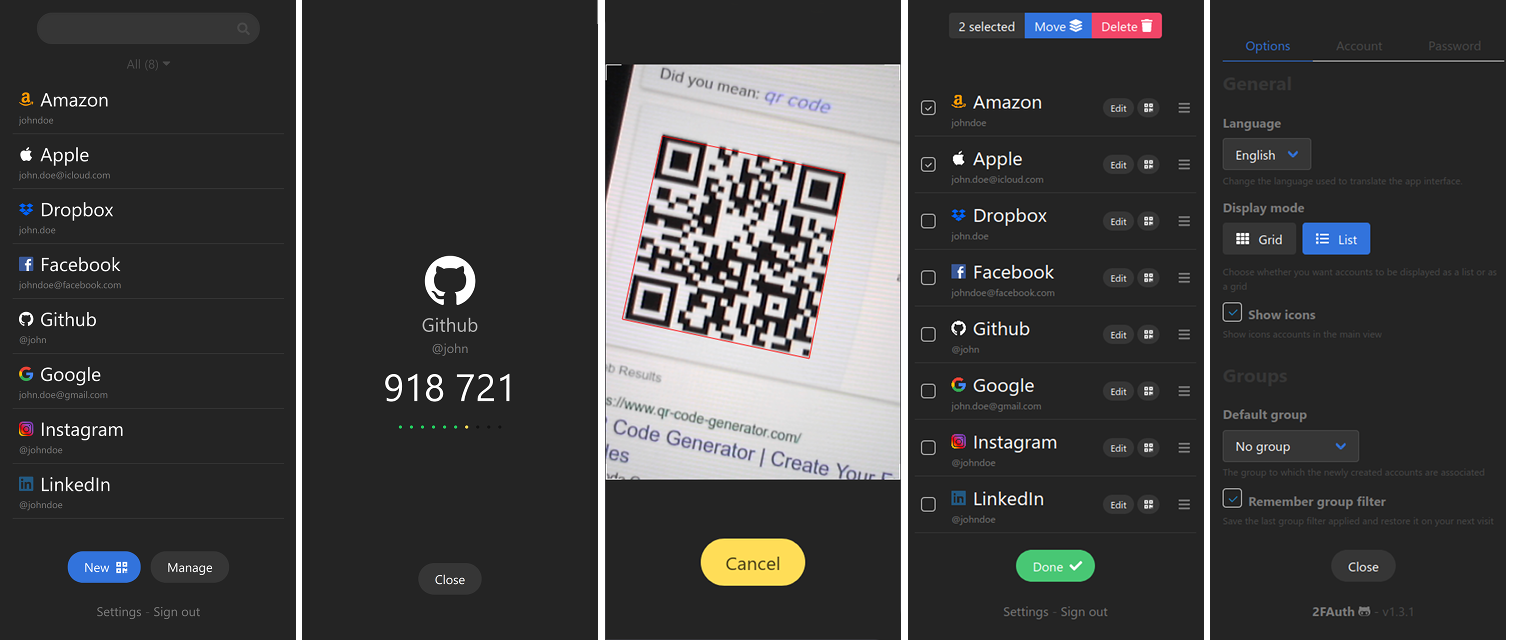
2FAuth Demo
Credentials (login - password) : demo@2fauth.app - demo
Purpose
2FAuth is a web based self-hosted alternative to One Time Passcode (OTP) generators like Google Authenticator, designed for both mobile and desktop.
It aims to ease you perform your 2FA authentication steps whatever the device you handle, with a clean and suitable interface.
I created it because :
- Most of the UIs for this kind of apps show tokens for all accounts in the same time with stressful countdowns (in my opinion)
- I wanted my 2FA accounts to be stored in a standalone database I can easily backup and restore (did you already encountered a smartphone loss with all your 2FA accounts in Google Auth? I did...)
- I hate taking out my smartphone to get an OTP when I use a desktop computer
- I love coding and I love self-hosted solutions
Main features
- Manage your 2FA accounts and organize them using Groups
- Scan and decode any QR code to add account in no time
- Add custom account without QR code thanks to an advanced form
- Edit accounts, even the imported ones
- Generate TOTP and HOTP security codes and Steam Guard codes
2FAuth is currently fully localized in English and French. See Contributing if you want to help on adding more languages.
Security
2FAuth provides several security mechanisms to protect your 2FA data as best as possible.
Multi-user app
You have to create a user account and authenticate yourself to use the app. Since version 4.0, you have the ability to allow multiple user accounts for different people. You can allow public registration, limit registration by email domain name, or turn registration off alltogether. You can also limit registration to SSO only.
Modern authentication
You can sign in 2FAuth using a security key like a Yubikey or a Titan key and disable the traditional login form.
Data encryption
Sensitive data stored in the database can be encrypted to protect them against db compromise. Encryption is provided as an option which is disabled by default. It is strongly recommended to backup the APP_KEY value of your .env file (or the whole file) when encryption is On.
Auto logout
2FAuth automatically log you out after an inactivity period to prevent long life session. The auto logout can be deactivated or triggered when a security code is copied.
RFC compliance
2FAuth generates OTP according to RFC 4226 (HOTP Algorithm) and RFC 6238 (TOTP Algorithm) thanks to Spomky-Labs/OTPHP php library.
Requirements

- See Laravel server requirements
- Any database supported by Laravel
Installation guides
Upgrading
Migration
2FAuth supports importing from the following formats: 2FAuth (JSON), Google Auth (QR code), Aegis Auth (JSON, plain text), 2FAS Auth (JSON)
Contributing
You can contribute to 2FAuth in many ways:
- By reporting bugs, or even better, by submitting a fix with a pull request on the dev branch.
- By suggesting enhancement or new feature. Please have a look to the 2FAuth development project, maybe your idea is already there.
- By correcting or completing translations in a language you speak, using the Crowdin platform. Ask for your language if this one is lacking.
License
Requirements
Categories
Download Statistics
Total Downloads Over Time
Related apps
Explore more like this
Explore allLinks
Details
2fauth/2fauth:latestRuntime arguments
- Web UI
http://[IP]:[PORT:8000]/- Network
bridge- Shell
sh- Privileged
- false
Template configuration
- Target
- 8000
- Value
- 8805
- Target
- /2fauth
- Value
- /mnt/user/appdata/2fauth/
You can change the name of the app
- Value
- 2FAuth
This should be your email address
- Value
- mail@example.com
The encryption key for our database and sessions. Keep this very secure.
- Value
- SomeRandomStringOf32CharsExactly
This variable must match your installation's external address.
- Value
- http://Unraid_IP:8805
- Value
- local
- Default
- false|true
- Value
- false
- Value
- daily
- Default
- info|debug|notice|warning|error|critical|alert|emergency
- Value
- info
Database config (can only be sqlite)
- Value
- /srv/database/database.sqlite
- Value
- file
- Value
- file
- Value
- log
- Value
- smtp.mailtrap.io
- Value
- 2525
- Value
- null
- Value
- null
- Value
- null
- Value
- null
- Value
- null
- Value
- null
- Default
- true|false
- Value
- true
Set to null to disable the API throttling.
- Value
- 60
This setting applies to both email/password and webauthn login attemps.
- Value
- 5
- Default
- web-guard|reverse-proxy-guard
- Value
- web-guard
- Value
- null
- Value
- null
- Value
- null
- Value
- null
- Value
- null
- Value
- null
- Default
- preferred|required|discouraged
- Value
- preferred
- Value
- *
- Value
- null